Threat analysis
Hover before you click? Not when the link starts at google.com
Attackers send people through Google's own redirect links, so the address you see when you hover is the trusted one. The check we teach people no longer tells them where they land.
Riccardo Brigatti ·
Questo articolo non è ancora disponibile in italiano: lo trovi qui in inglese. Il resto del sito resta in italiano.
We tell people to hover over a link before they click it. The address appears in the corner of the window, and if it looks right, they click. It is good advice for the links it was written for. It stops working when the first address in the chain is one that everyone trusts.
The address you hover is the first hop
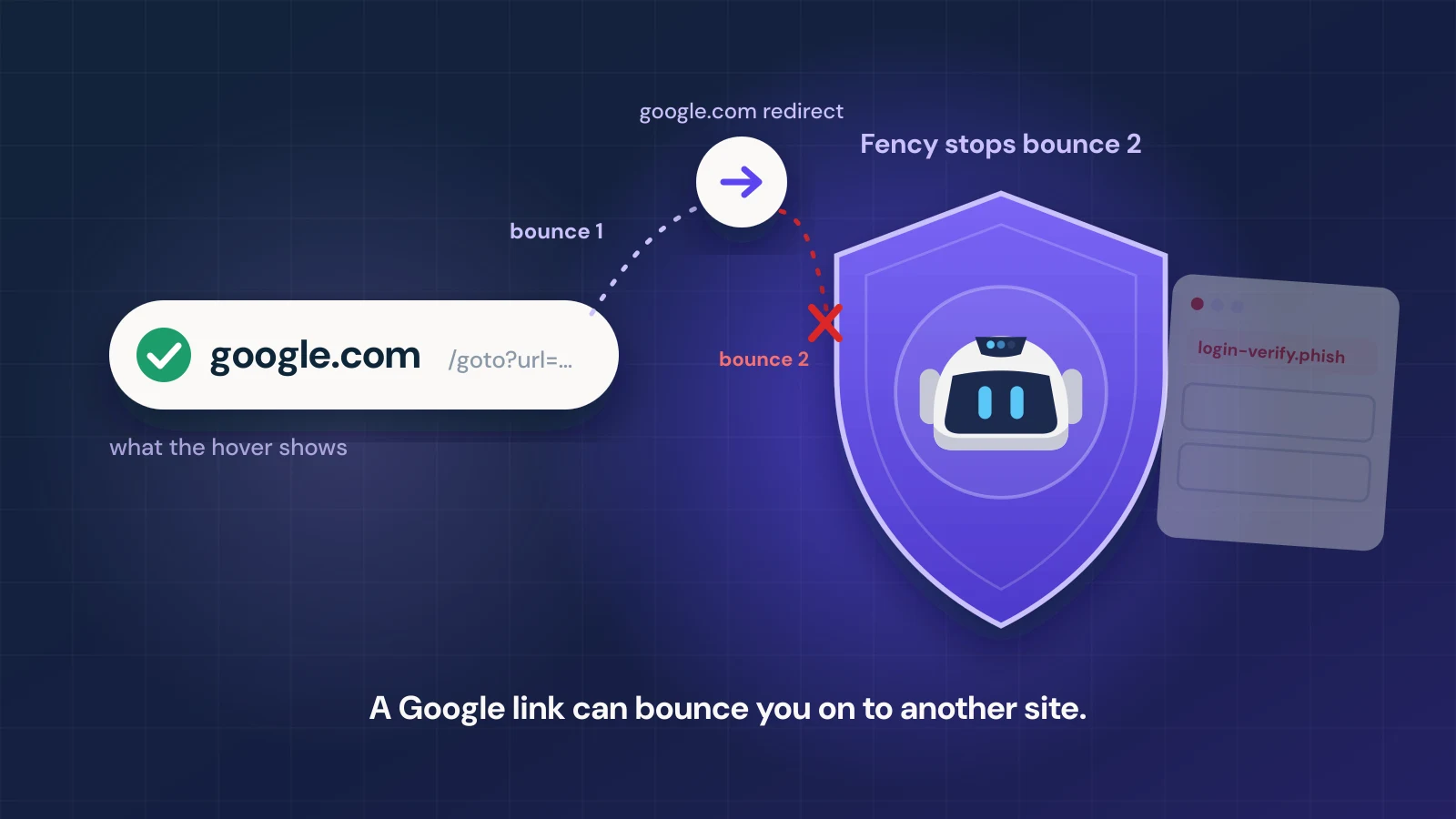
Google runs several redirect endpoints. A link of the form google.com/goto?url= sends the browser on to whatever address is stored in the url= parameter. Defanged, the pattern looks like this:
google.com/goto?url=hxxps://[.]example-login[.]com/verify
The status bar shows google.com. The page the person lands on is at the address after url=.
We call this a bounce. The browser goes to google.com first, and google.com immediately sends it on to a second address, without the person doing anything. The first leg is the one the person sees and checks; the second leg, the bounce to the phishing site, happens too quickly to notice. Researchers have documented the same kind of abuse on other Google redirect endpoints for years, such as /url?q=. Mimecast describes how redirect abuse feeds phishing and spam delivery, and Security Affairs reported on Google and Adobe open redirects being used in phishing.
Hovering shows the first hop. For a Google link, that is the one address that tells the person nothing about the page they will end up on.
It goes further than one redirect
Some campaigns chain several hops through different Google services before the final page: one service forwards to another, which forwards to a third, and only the last one is the phishing site. KnowBe4 calls this a trust proxy: each hop is a Google address, so the chain looks like ordinary browsing. Check Point has described a similar campaign that uses trusted Google Cloud automation to avoid detection.
A non-technical user who hovers over the link sees one or two of these hops, and both are google.com. The check passes, and the next page is the one that matters.
How our R&D team found it
What we saw in the wild
It started with a phishing message a customer received — not an email, a Google Calendar invitation, with the lure written into the event’s description:
All parties have invited you to edit the following document:
📄 Final Agreement and Settlement Reports On Tuesday, September 15, 2026. You’re only invited within your organization.
Review Documents Contributors can add and edit all files in this drive.
A legal-sounding document name, a date, “only within your organization,” and a button to review. It arrives in the calendar, where people are less on guard about links than in their inbox.
That button pointed to an address starting at google.com. Defanged, with the tracking token removed:
hxxps://www[.]google[.]com/url?q=hxxps://trk[.]klclick3[.]com/ls/click?upn=[…]&sa=D&source=calendar
Read left to right, the browser makes two bounces before any page loads: first through Google’s own redirect — the part a hover shows — then through the click-tracking link of an email marketing service, used here as a second hop rather than for tracking. Only after that does it meet a Cloudflare “verifying you are human” check, and only after that, the phishing page.
Each hop serves the same purpose: to look trustworthy to whoever, or whatever, checks it. A link scanner like Microsoft Safe Links sees two reputable domains and, if it follows the link itself, is turned away by the anti-bot check before it ever reaches the phishing page — so it clears the link as safe. A person sees the same two domains, passes the “I’m human” click, and reaches the page the scanner never saw.
What we did
That case answered how one attack worked. It did not answer how hard it would be to build another. So we turned the question around: instead of taking apart links other people had sent, could we generate valid google.com redirect links ourselves, to any destination we chose?
We built a script to test that. Given a destination, it produced a working google.com link to it, on demand, without copying an existing campaign.
It worked for every destination we tried, which is the point: the hover check doesn’t just fail against links attackers already sent out, it fails against any link we chose to build. The script is ours, shown below so the method is verifiable rather than a claim; the parts that would make it produce a working link on its own are marked.
Show the script
#!/usr/bin/env bash
# Linux · Bash 4+ and curl only.
# Usage: bash google_redirect_auto.sh example.com
set -euo pipefail
umask 077
usage() {
cat <<'HELP'
Usage:
bash google_redirect_auto.sh DOMAIN_OR_URL
bash google_redirect_auto.sh
Examples:
bash google_redirect_auto.sh 'https://example.com/'
bash google_redirect_auto.sh example.com
Without arguments, prompts for the final domain or URL.
Automatically builds the Google request.
Prints /goto links without gsessionid to stdout.
Prints messages to stderr.
Does not follow redirects or open the destination.
Exit codes:
0 Link found
1 Error
2 No goto link found
64 Invalid arguments
Dependencies: Bash 4+ and curl.
HELP
}
destination=''
while (($#)); do
case "$1" in
-h|--help)
usage
exit 0
;;
--*)
printf 'Unknown option: %s\n' "$1" >&2
exit 64
;;
*)
if [[ -n "$destination" ]]; then
printf 'Specify only one destination.\n' >&2
exit 64
fi
destination=$1
shift
;;
esac
done
if ! command -v curl >/dev/null 2>&1; then
printf 'Missing dependency: curl\nOn Debian/Ubuntu: sudo apt install curl\n' >&2
exit 1
fi
if [[ -z "$destination" ]]; then
if [[ ! -t 0 ]]; then
usage >&2
exit 64
fi
read -r -p 'Destination (e.g. https://example.com/): ' destination
fi
# Trim leading and trailing whitespace.
destination="${destination#"${destination%%[![:space:]]*}"}"
destination="${destination%"${destination##*[![:space:]]}"}"
if [[ -z "$destination" || "$destination" =~ [[:space:][:cntrl:]] ]]; then
printf 'Empty destination or invalid whitespace/control characters. Use %%20 for spaces.\n' >&2
exit 1
fi
scheme_pattern='^[a-zA-Z][a-zA-Z0-9+.-]*:'
if [[ ! "$destination" =~ $scheme_pattern ]]; then
destination="https://$destination"
fi
case "$destination" in
http://*|https://*) ;;
*)
printf 'Use an HTTP/HTTPS URL.\n' >&2
exit 1
;;
esac
authority=${destination#*://}
authority=${authority%%[/?#]*}
if [[ -z "$authority" || "$authority" == *'@'* ]]; then
printf 'Use a URL with a hostname and without credentials.\n' >&2
exit 1
fi
# Percent-encode a value using Bash builtins.
urlencode() {
local LC_ALL=C
local input=$1 output='' char encoded i
for ((i = 0; i < ${#input}; i++)); do
char=${input:i:1}
case "$char" in
[a-zA-Z0-9.~_-])
output+="$char"
;;
*)
printf -v encoded '%%%02X' "'$char"
output+="$encoded"
;;
esac
done
REPLY=$output
}
urlencode "$destination"
request_url="https://www.google.com/url?q=$REPLY"
printf 'Fetching response from Google…\n' >&2
# -q disables ~/.curlrc.
# No -L: redirects are never followed.
# Append the HTTP status on a separate final line.
if ! response=$(curl -q --silent --show-error --compressed \
--proto '=https' \
--connect-timeout 10 \
--max-time 20 \
--max-filesize 2097152 \
--include \
--header 'Accept: text/html' \
--header 'Accept-Language: en-US,en;q=0.9' \
--write-out $'\n%{http_code}' \
--url "$request_url"); then
printf 'Request to Google failed.\n' >&2
exit 1
fi
http_status=${response##*$'\n'}
response=${response%$'\n'*}
if [[ ! "$http_status" =~ ^[0-9]{3}$ ]]; then
printf 'Could not determine the HTTP response status.\n' >&2
exit 1
fi
declare -a links=()
# Validate a Google /goto URL and remove gsessionid.
add_candidate() {
local value=$1 query fragment='' item key token
local clean_query='' has_token=0 existing
local -a parameters=()
case "$value" in
/goto\?*)
value="https://www.google.com$value"
;;
https://www.google.com/goto\?*|https://www.google.com:443/goto\?*)
;;
*)
return 0
;;
esac
if [[ "$value" =~ [[:space:][:cntrl:]] ]]; then
return 0
fi
query=${value#*\?}
if [[ "$query" == *'#'* ]]; then
fragment="#${query#*#}"
query=${query%%#*}
fi
IFS='&' read -r -a parameters <<< "$query"
for item in "${parameters[@]}"; do
key=${item%%=*}
# Decode ASCII percent escapes in parameter names for comparison.
# Keep the original parameter text and token encoding unchanged.
local decoded_key='' rest=$key byte
while [[ -n "$rest" ]]; do
if [[ "$rest" =~ ^%([0-9a-fA-F]{2}) ]]; then
byte=${BASH_REMATCH[1]}
if [[ "$byte" == 00 ]]; then
decoded_key+='?'
else
printf -v byte '%b' "\\x$byte"
decoded_key+="$byte"
fi
rest=${rest:3}
else
decoded_key+=${rest:0:1}
rest=${rest:1}
fi
done
if [[ "$decoded_key" == 'gsessionid' ]]; then
continue
fi
if [[ "$decoded_key" == 'url' && "$item" == *=* ]]; then
token=${item#*=}
if [[ -n "$token" ]]; then
has_token=1
fi
fi
if [[ -n "$clean_query" ]]; then
clean_query+='&'
fi
clean_query+="$item"
done
if (( ! has_token )); then
return 0
fi
value="${value%%\?*}?${clean_query}${fragment}"
for existing in "${links[@]}"; do
if [[ "$existing" == "$value" ]]; then
return 0
fi
done
links+=("$value")
}
case "$http_status" in
3??)
# Select the Location header from the final HTTP header block.
location=''
while IFS= read -r line; do
line=${line%$'\r'}
if [[ "$line" == HTTP/* ]]; then
location=''
elif [[ "${line,,}" == location:* ]]; then
location=${line#*:}
location="${location#"${location%%[![:space:]]*}"}"
location="${location%"${location##*[![:space:]]}"}"
elif [[ -z "$line" && -n "$location" ]]; then
add_candidate "$location"
location=''
fi
done <<< "$response"
;;
2??)
decoded=$response
# Decode common JavaScript escapes used in URLs.
decoded=${decoded//\\u0026/&}
decoded=${decoded//\\u002F/\/}
decoded=${decoded//\\u002f/\/}
decoded=${decoded//\\u003D/=}
decoded=${decoded//\\u003d/=}
decoded=${decoded//\\u003F/?}
decoded=${decoded//\\u003f/?}
decoded=${decoded//\\u003A/:}
decoded=${decoded//\\u003a/:}
decoded=${decoded//\\x26/&}
decoded=${decoded//\\x2F/\/}
decoded=${decoded//\\x2f/\/}
decoded=${decoded//\\x3D/=}
decoded=${decoded//\\x3d/=}
decoded=${decoded//\\x3F/?}
decoded=${decoded//\\x3f/?}
decoded=${decoded//\\x3A/:}
decoded=${decoded//\\x3a/:}
decoded=${decoded//\\\//\/}
# Decode common HTML entities used in URL attributes.
# Disable replacement expansion so "&" stays literal.
shopt -u patsub_replacement 2>/dev/null || :
decoded=${decoded//&/&}
decoded=${decoded//&/&}
decoded=${decoded//&/&}
decoded=${decoded//&/&}
decoded=${decoded//"/\"}
decoded=${decoded//"/\"}
decoded=${decoded//'/\'}
decoded=${decoded//'/\'}
# Find quoted absolute or relative Google /goto URLs.
pattern="[\"']((https://www[.]google[.]com(:443)?)?/goto[?][^[:space:]<>\"']+)[\"']"
while [[ "$decoded" =~ $pattern ]]; do
matched=${BASH_REMATCH[0]}
candidate=${BASH_REMATCH[1]}
add_candidate "$candidate"
decoded=${decoded#*"$matched"}
done
;;
*)
printf 'Google returned HTTP %s.\n' "$http_status" >&2
exit 1
;;
esac
if ((${#links[@]} == 0)); then
if [[ "$http_status" == 3?? ]]; then
printf 'Google returned an HTTP redirect without a goto link.\n' >&2
else
printf 'No goto link found. Google may require consent or JavaScript, or return a different page.\n' >&2
fi
exit 2
fi
printf '%s\n' "${links[@]}"
printf '%s link(s) extracted. Validity, lifetime, and reuse across sessions have not been verified.\n' \
"${#links[@]}" >&2This specific flow no longer works today. We are not publishing the exact steps: the method is the part that matters for defenders, and the working details would only help someone reproduce the abuse.
What the person sees next
The landing page is usually built to look like the place the person expected to be: a sign-in page, a document viewer, a shared file. It asks for the password, a one-time code or a download. By the time it asks, the person has already trusted the link, because the address they checked was Google’s.
Our take: you can’t train people to spot what a machine is built to hide
A bar chart in four steps: right after training, a person would likely catch this; a week later, maybe; a month later, the details are gone; three months later, at 9:04 AM with 40 unread emails, there is no check left, only a click. The email that abuses this arrives on its own schedule, not on the trainee's.
Here is what this whole investigation comes down to. Nothing a person did wrong, in this case, would have been fixable by training. The address was google.com. The second hop was a reputable tracking domain. The check before the phishing page was the same “verifying you are human” prompt that half the legitimate web shows every day. Every signal a careful person is taught to check said trust this. And we proved it wasn’t one unlucky link: we built a script that forges the same trust on demand, for any destination, in seconds.
That is the part the security industry keeps getting backwards. Awareness training treats phishing as a habit problem: be more careful, read the address, hover before you click. But a five-minute module finished by clicking next, next, next, and a quick “is this safe?” pasted into a chatbot, are not a defense against infrastructure built specifically to defeat a human checking an address. They were never going to be. No amount of attention fixes a check that a script can forge at will, and the industry’s answer to an unfixable check cannot keep being “ask people to run it more carefully.”
So we stopped asking people to be the control. Fency sits on the redirect itself, follows it the way the browser is about to, and stops the page before it loads, whether the first address was google.com, a colleague’s domain, or anything else a person has learned to trust. That is the only place a check like this still works: before the human ever gets a vote.
Sources
- Mimecast, Google Redirect Abuse Powers Phishing and Spam Delivery
- Security Affairs, Phishers continue to abuse Adobe and Google open redirects
- KnowBe4, Bypassing the Gatekeepers: how a global phishing campaign turns Google’s infrastructure into a trust proxy
- Check Point Research, Phishing campaign leverages trusted Google Cloud automation capabilities to evade detection